Record, transcribe, study
Record the class where you're allowed to, transcribe it free and offline on your own computer, and get a lecture note with the audio and transcript inside.
Obsidian vault for university students
Why it works
Lectures in one app, due dates in another, flashcards somewhere else. Semester Vault puts your whole semester in one connected place.
Without a system
With Semester Vault
The product
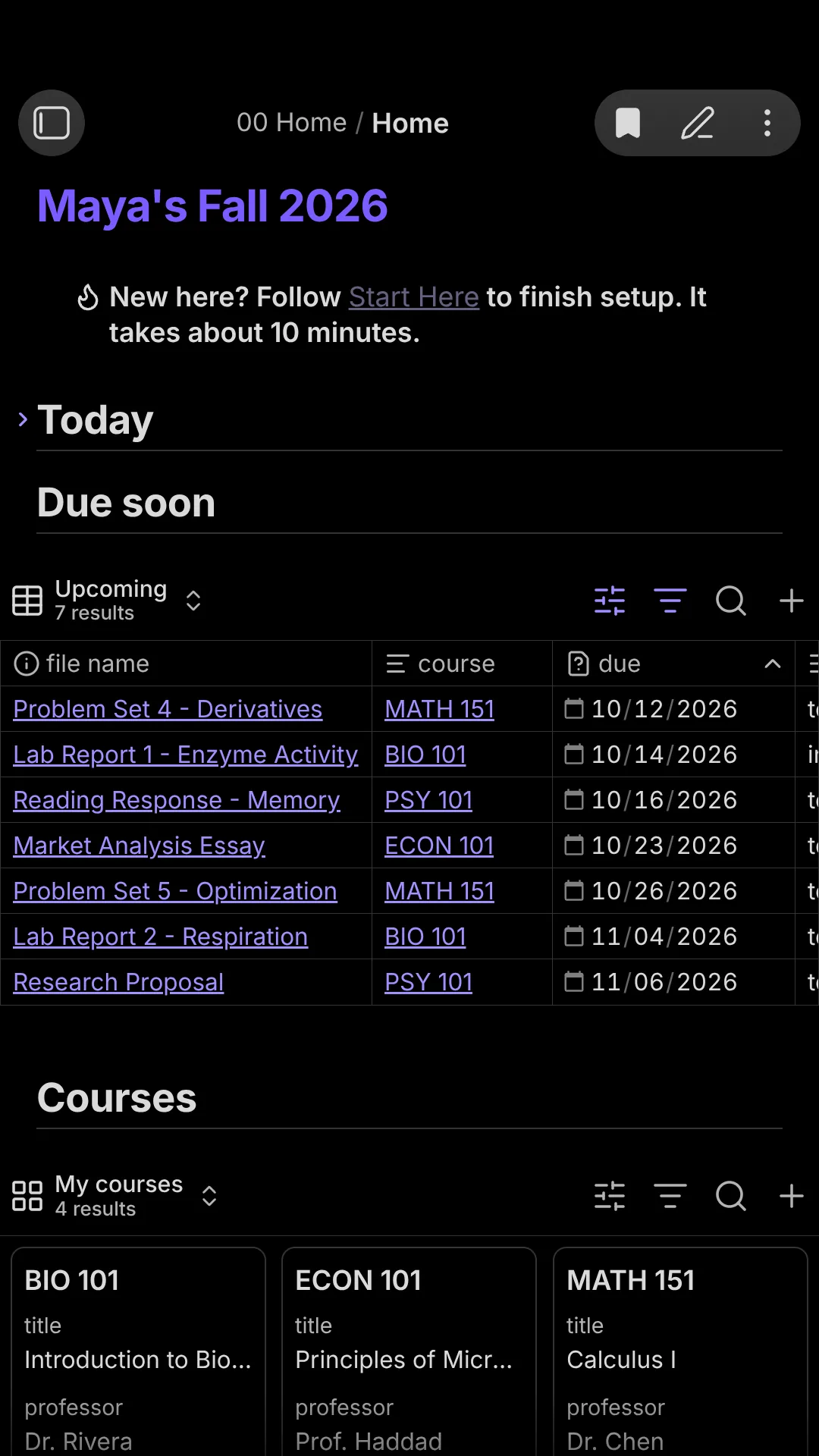
These are real screens from the vault, with example courses. Yours fills with your own classes, notes and deadlines.
AI second brain
Out of the box, AI knows nothing about your courses, your lectures or the topics you keep getting wrong. Semester Vault keeps all of it as clean, linked notes, and gives your AI that context in two steps.
The vault writes them from your setup answers: your courses, your goal, how you like to study. Paste them into ChatGPT, Claude or Gemini.
One command bundles a course's lectures, concepts and deadlines into a single file. Notes you mark private stay out.
"Quiz me on week 3." "Plan my revision for the midterm." "How does this lecture connect to my other course?"
Quiz me on week 3 of BIO 101. One question at a time.
From your Sep 21 lecture on homeostasis: what are the three parts of a feedback loop?from: Homeostasis (recorded lecture)
Sensor, control centre, effector.
Correct. Your notes also link this to Equilibrium in ECON 101. Next: why does negative feedback keep a system stable?from: Negative Feedback · Equilibrium
You stay in control. Nothing is uploaded for you; you choose which file goes to which AI. The instructions tell your AI to teach and quiz you, not to write your assignments.
What's inside
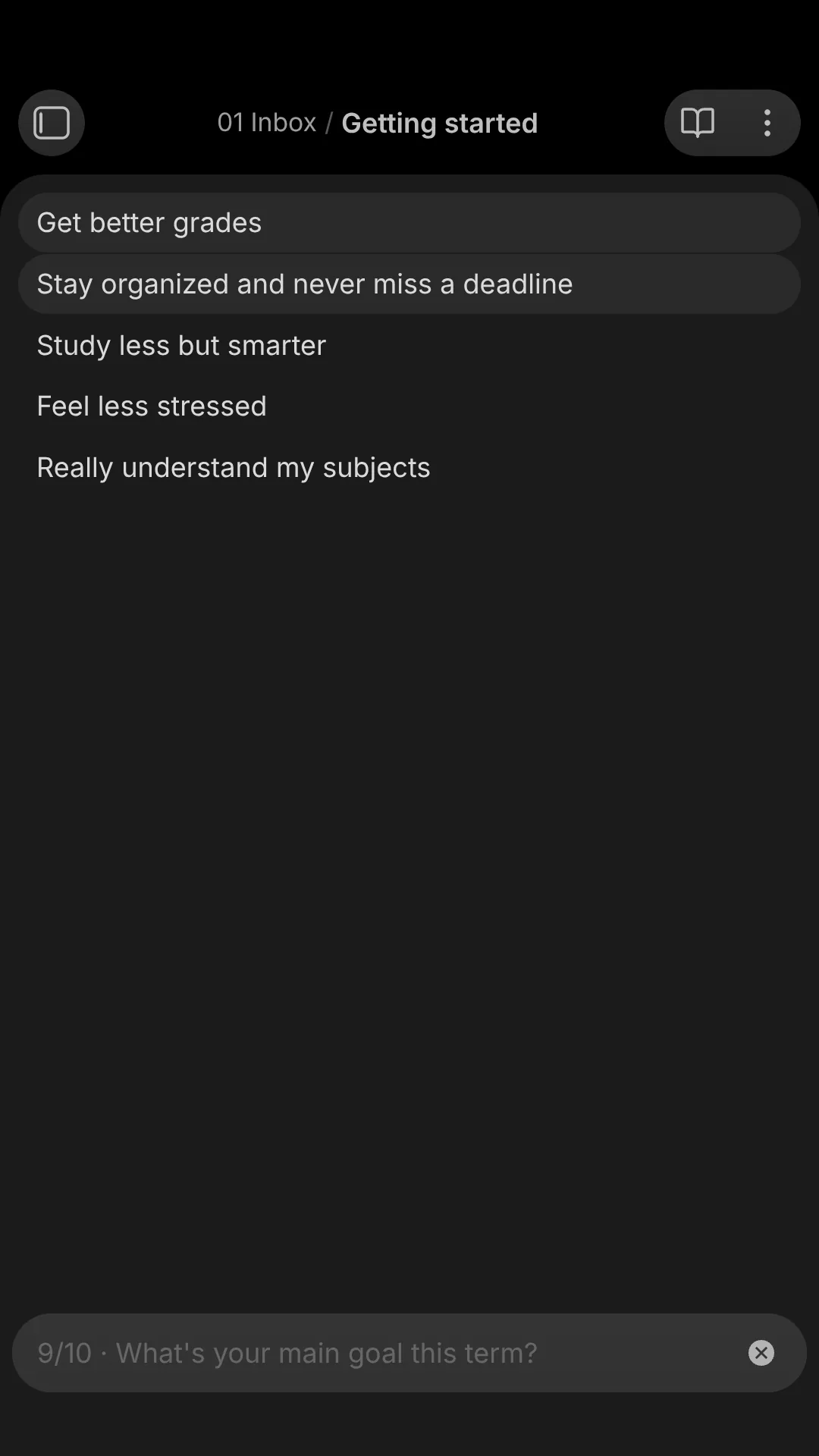
Open the vault, answer about 10 quick questions, and it builds your courses, timetable and dashboard around your answers. Every lecture links to its course, every concept links across courses, and your graph grows with every note.
Record the class where you're allowed to, transcribe it free and offline on your own computer, and get a lecture note with the audio and transcript inside.
Name, school, courses, goal and study style. Two minutes later the vault is yours, with a colour for every course.
Ideas link across courses. Open the graph and watch your semester grow, note by note.
Every concept ends in flashcards. Review them with spaced repetition right inside Obsidian.
Add an assignment or exam in a few taps. Home lists everything due, sorted by date.
Each exam gets a spaced revision plan, from listing topics two weeks out to sleeping well the night before.
Who it's for
Start your degree with a system from day one, instead of fixing it in year three.
Concepts, formulas and flashcards linked across every course, ready for the next exam.
Readings, lecture notes and essay ideas connected in one place.
Work, clubs or a long commute? Home shows what's due next, so nothing slips.
How it works
Pay once with card, Apple Pay or Google Pay. The vault and the step-by-step guide arrive by email right away.
Open it in Obsidian (free), add two free plugins from Obsidian's store, and answer the setup questions. The guide shows every click.
Track deadlines, link ideas across courses, review flashcards and give your AI the context it needs.
Works on Mac, Windows, Linux, iPhone, iPad and Android. Transcribing recordings is done on a computer.
One simple price
Keep using the free notes app you already love. Add the structure that makes it work for university, without another monthly bill.
Built for real courses, not generic productivity.
Semester Vault
Instant digital download. No subscription.
Your purchase includes
Secure checkout with Polar · Card · Apple Pay · Google Pay
Digital purchase; see refund terms. Need help? Email us.
Not sure yet?
A small version with the dashboard, a few linked notes and the AI instructions, so you can try it before you buy. We'll email it to you.
Starter vault not built yetChatGPT, Claude, Gemini and any other AI that lets you add custom instructions and attach or paste a file. The vault writes your instructions and builds the context pack, and you pick the AI you like best.
Your AI gets your own lectures, concepts and deadlines, so it can quiz you on week 3, explain what you missed, build flashcards and plan your exam revision. Your instructions tell it to teach and quiz you, not do your work for you. Always follow your school's and your professors' AI rules.
On your own device, as plain text files that are yours forever. Keep the folder in iCloud, Google Drive or Dropbox if you like. You decide which file goes to which AI, and notes you mark private always stay out of context packs.
Obsidian, which is a free app, and two free plugins from Obsidian's official store: Templater and Spaced Repetition. The guide walks you through it, and setup takes about 10 minutes.
Right at the beginning. The guide starts with installing Obsidian and takes you through every step. Then the vault asks you a few setup questions and builds your courses for you.
Yes, wherever your school and professor allow it. The vault includes a short guide on asking for permission, and transcription runs free and offline on your own computer, so recordings stay with you.
Mac, Windows, Linux, iPhone, iPad and Android. Your notes, dashboards and flashcards come with you everywhere. Transcribing recordings is done on a computer.
Yes. It's organized by course, lecture, concept and exam, so it works for any degree, from biology to business. You add your own courses the first time you open it.
Instantly. A download link arrives by email right after checkout, and you can also download it from your receipt page.
Yes. Every version 5 update is free.